Recording hours with a project organisation
A project organisation is a temporary organisation set up to carry out a project. The organisation has a project director, project departments and its own project managers. The employees of a project organisation are employees of different companies, in other words the project partners.
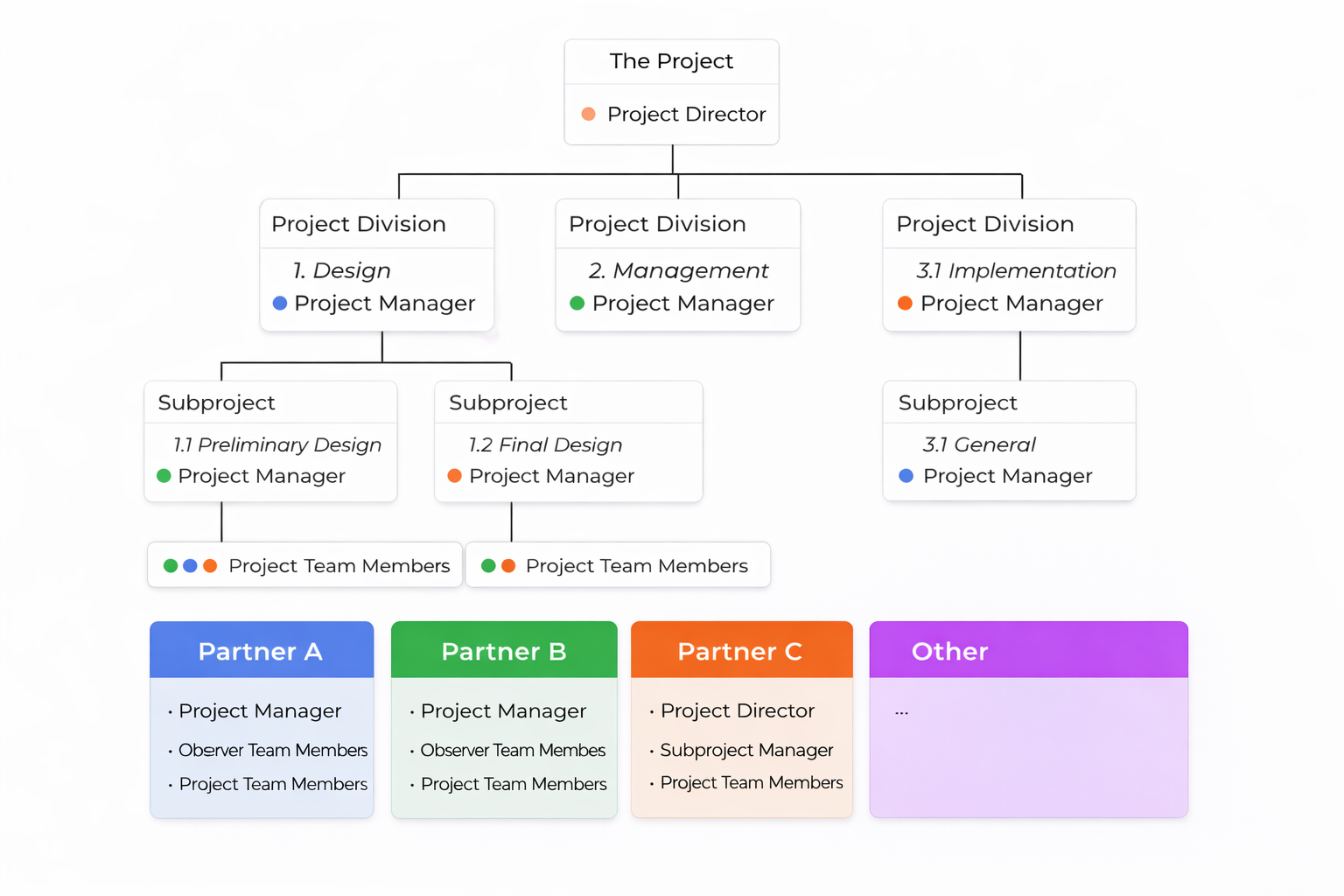
What is a project organisation?
The organisation can be a separate, temporary legal entity set up for the project, for example in the form of a VOF (general partnership) or a THV (temporary joint venture). A project organisation decides on its own administration. Because several partners work together, there is a risk that hours data is delivered in different formats and at different moments. That can result in an unnecessarily complicated and time consuming expense process. ClockWise offers a solution for this. Working in one system prevents it. A uniform process is created for recording, approving and reporting hours. A basis for the dashboards and the financial administration, independent of the partners. And it saves time. At the same time, the partners can view the hours of their own employees in the system themselves.
The process of recording hours and the roles
The project employee The project employee records hours and submits them to the project manager for approval. A project employee can record hours on different sub-projects. A rate applies to the hours recorded. The project manager The project managers can see the timesheets submitted for their part of the project. They can approve or reject these hours and send them back to the project employee. The project manager can see all hours recorded on their sub-project. Those are the hours of all project employees, regardless of the project partner. The project director The project director can view all hours recorded in the project and approve the managers' hours. The finance manager The finance manager can process the approved hours financially. For every partner they can print a list of hours with the hours that may be claimed. The finance manager has insight into the total of hours claimed for the project and the sub-projects, and the amounts that go with them. They keep track of changes to the rates. Viewing manager When a partner receives a pro forma invoice, the viewing user of that partner can check the hours in the system once more. Hours can then still be exported to other systems. Project administrator or system administrator The administrator supervises the process. They make sure employees can do their job by assigning permissions and granting access to the data they need. The administrator takes care of maintaining the process.
Why ClockWise?
The options in ClockWise fit the structure of the project organisation described above, the process and the roles and permissions perfectly. Functional ClockWise makes sure data is available in a uniform way. The process of recording hours and claiming expenses is arranged centrally. The project partners can view their own hours themselves, while the system stays independent of the partners. Reports on projects are available for project managers. Data can be exported or connected to other systems, such as a dashboard or the accounts. Clear roles and permissions on the data entered, with clarity about who can see which data. Operational There is a short implementation time. It is easy to scale up and down. That comes in handy in the different phases of the project, when more or fewer employees need to keep track of hours. It is online and also available through apps. No external people need to come into your own system. Keep your data with the right people. Independent third party.
Are you already a customer, or would you like more information?
Then take a look at our knowledge centre.
Experience it yourself
We understand that implementing ClockWise straight away is a big step. That is why we offer ClockWise free for 4 weeks. During those 4 weeks you can use all the features, with the support of our service desk.

Frequently asked questions